
Scope of this source tag: v1.2.10-extension changes how the browser extension presents and retains a login attempt. It does not introduce a new encryption design, change Authier’s cryptographic parameters, or constitute a security audit.
Authier’s
v1.2.10-extension GitHub release
was published on August 14, 2026. Its bundled extension still identifies
itself as version 1.2.9, and the official stores do not currently offer a
1.2.10 build. This article documents the tagged source changes, not an
available 1.2.10 store rollout.
The two changes reorganize the extension login flow and refine popup navigation. Most of the work is not a new feature in a checklist; it is continuity around a browser-extension constraint: the popup disappears whenever it loses focus.
Login now starts inside the extension popup
Previously, a signed-out popup directed the user to open the full vault to log in or create an account. The tagged change renders a compact login form in the popup itself. The full-page vault uses the same login component, so both surfaces now share validation, error handling, password visibility controls, and the transition to device approval.
Account creation remains a full-tab flow. Selecting the sign-up path from the popup opens that tab in the foreground. This keeps the short returning-user path in the extension while preserving the existing account setup route.
A login attempt can outlive the popup
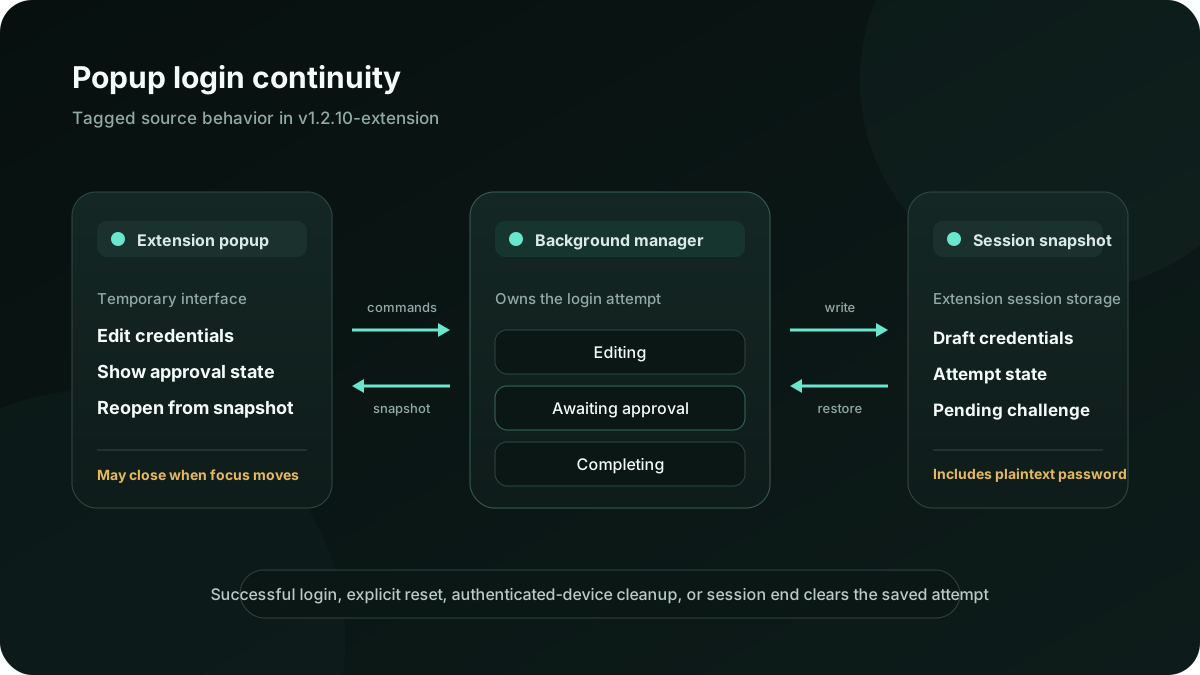
A browser popup is temporary UI. If a login attempt lived only in its React tree, closing the popup would tear down the form and approval polling. The tagged change puts that work in a dedicated background login-session manager. When the popup is opened again, it reads the current session snapshot instead of starting from an empty screen.
The manager tracks three explicit states: editing, awaiting approval, and completing. It stores the current draft and pending challenge in the browser’s session-scoped extension storage when that API is available, with the extension background context as the fallback. While that context is active, the manager checks the pending challenge. After a background restart, it restores a stored attempt and resumes checking. After approval, it completes the existing device-login exchange and clears the login snapshot. An explicit reset and detection of an already-authenticated device clear stale state as well.
Password-retention trade-off: the saved draft includes the master password in plaintext. It remains in the extension’s session storage—or background memory where that API is unavailable—so the login can survive popup closure. It is not sent to Authier’s server, but it remains available to the extension until successful login, explicit reset, authenticated-device cleanup, or the browser or extension session ends. A failed login can return to editing with the draft still retained. This longer in-extension lifetime is a security-relevant trade-off of the continuity feature.
That description is deliberately about state ownership and interface behavior. The tagged change still uses Authier’s existing password-derived key and trusted-device challenge. Moving code into a background manager should not be read as evidence that the underlying security model became stronger.
The approval screen is shared too
When an account policy requires device approval, both the compact popup and full-page vault now render the same pending-login component. It identifies the account and requesting device, reports whether push notifications were sent, and shows the known status of a master-device reset. A user can also abandon the attempt and choose a different account without waiting for the challenge to finish.
Approval remains configurable. Accounts can allow immediate enrollment, require an approved device, or require the designated master device. The tagged change affects how a pending request is carried through the extension; it does not make approval mandatory or remove the recovery trade-offs described in the trusted-device approval guide.
Popup controls have clearer names
The other change is small but visible. Popup menu buttons now expose labels that follow their current action, such as opening or closing a menu. The vault button uses the translated “Open vault” label, and related navigation controls are grouped together. The tab opened by the vault or sign-up action is explicitly activated.
These changes make the controls easier to identify for assistive technology and make the compact layout more predictable. They do not claim conformance with a particular accessibility standard; the tagged change is limited to labels, grouping, and navigation behavior.
What the tagged tests cover
The source tag adds focused tests for the new session manager. They cover restoring saved form values into a new manager, resuming approval checks from a stored attempt, discarding a stored attempt when the device is already authenticated, and completing an in-progress login after approval arrives. In a fresh test profile, the extension smoke test also checks that the popup presents the login heading.
Tests document intended behavior and help catch regressions; they are not a substitute for an independent assessment. Authier remains an early-stage project and has not published an independent third-party security audit. The security architecture and limitations page describes the current encryption design and the evidence that is—and is not—available.
Review the change: inspect the tagged extension source and read the security limitations. The official stores currently serve earlier builds, so they cannot yet be used to test these tagged changes.